✌ Vuex 란?
Vuex는 한마디로 얘기하자면 상태(state)를 관리하는 라이브러리이다.
여기서 상태란 무엇일까?
copy lessnew Vue({
  // 상태
  data () {
    return {
      count: 0
    }
  },
  // 뷰
  template: `
    <div>{{ count }}</div>
  `,
  // 액션
  methods: {
    increment () {
      this.count++
    }
  }
})
여기 간단한 Vue.js 앱이 있다.
여기서 data() 를 우린 "상태(state)" 라고 부른다. (컴포넌트 간 공유할 수 있는 데이터)
바로 이 상태를 관리하는 것이 Vuex 이다.
✌ Vuex는 언제, 왜 필요한가?
prop이나 ref 등으로 컴포넌트 간 데이터(상태)를 공유할 수 있는데 굳이 Vuex가 필요할까?
- 공통의 상태를 공유하는 여러 컴포넌트가 있는 경우, 지나치게 중첩된 컴포넌트를 통과하는 prop이 생기게 된다. 이는 나중에 유지보수하기 힘든 난해한 코드가 될 수 있다.
- 공통의 상태를 공유하기 때문에, 이 상태가 여러 컴포넌트에서 동일한 상태로 관리되어야 한다. Vue는 단방향으로 데이터가 흐르기때문에, 여러 컴포넌트가 한 상태를 공유하는 경우, 형제 컴포넌트간의 상태공유/관리가 복잡해질 수 있다.
이 때 우린 Vuex를 사용한다. 알 수 있듯이, 컴포넌트가 많은 중대형 규모의 SPA 에서 유용하게 쓰인다.
🚨 주의
아래에서 설명하겠지만 Vuex 는 store(저장소)를 가지고 있다.
즉, 상태(state)의 저장소를 가지고 있는 것인데, 이 저장소라는 말 때문에 Vuex가 세션/쿠키 localStorage 처럼 브라우저가 닫히지 않는 이상 계속 유지되는, Vuex 저장소에 상태(state)가 저장되는 것 처럼 느껴질 수 있다.
하지만 Vuex 의 상태는 메모리에 저장되는 것이기 때문에 새로 고침시 초기화 된다.
Vuex는 컴포넌트 단위의 data() 가 그저 어플리케이션 단위의 data()가 된 것이라고 보면 된다. data()가 localStorage에 저장되진 않는다. 새로고침하면 당연히 초기화됨..😅
상태를 새로고침 시에도 유지 하고 싶다면 vuex-persistedstate(state - localstorage 동기화 라이브러리) 같은 또 다른 라이브러리가 필요하다.
✌ Vuex 설치하기
vue
copy htmlvue add vuex
npm
copy sqlnpm install vuex --saveYarn
copy csharpyarn add vuex
(나는 npm 으로 설치해줬다)
Vuex는 상태(state)를 저장하고 있는 저장소(store)를 가지고 있다.
Vuex가 설치되었다면 이 저장소를 관리하는 파일을 생성해주자.
copy javascriptimport Vue from "vue";
import Vuex from "vuex";

Vue.use(Vuex);

export const store = new Vuex.Store({
    state: {

    }
    // ...
});
/src/store.js
/src 경로에 store.js 파일을 만들고 위와 같이 입력해줬다.
Vue.use() 를 통해 Vue가 Vuex 사용함을 선언하고, store 인스턴스를 생성해준 것이다.
copy javascriptimport Vue from 'vue'
import App from './App.vue'
import { store } from "./store";

Vue.config.productionTip = false

new Vue({
  render: h => h(App),
  store: store,
}).$mount('#app');
/src/main.js
main.js 에선 만들어준 store.js 를 import 해온 뒤 Vue 인스턴스에 주입하자.
여기서 잠깐 위 코드에 대해 설명하자면,
Vue.config.productionTip 는 Vue 앱이 처음 실행 될 때 나오는 경고문(배포에 대한 팁)을 출력할 것인지 물어보는 내용이다.
false로 설정하면 경고문(배포에 대한 팁)을 출력하지 않는다.
default 는 false 이다.
render: h => h(App)은 네 단계에 거쳐서 ES6로 변형된 메소드이다.
copy javascript// #1
render: function (createElement) {
    return createElement(App);
}

// #2
render (createElement) {
    return createElement(App);
}

// #3
render (h){
    return h(App);
}

// #4
render: h => h(App);
ES6 문법이라는 것은 이제 알겠고...
정확히 render() 라는 것이 무엇을 의미하는 걸까?
위 코드에서 #1을 보면 render는 실질적으로 createElement()의 반환 값이라는 걸 알수 있다.
여기서 createElement() 란, Virtual DOM(가상 돔)을 만드는 메소드이다.
Virtual DOM(가상돔)
copy xml<div>
  <h1>My title</h1>
  Some text content
  <!-- TODO: Add tagline  -->
</div>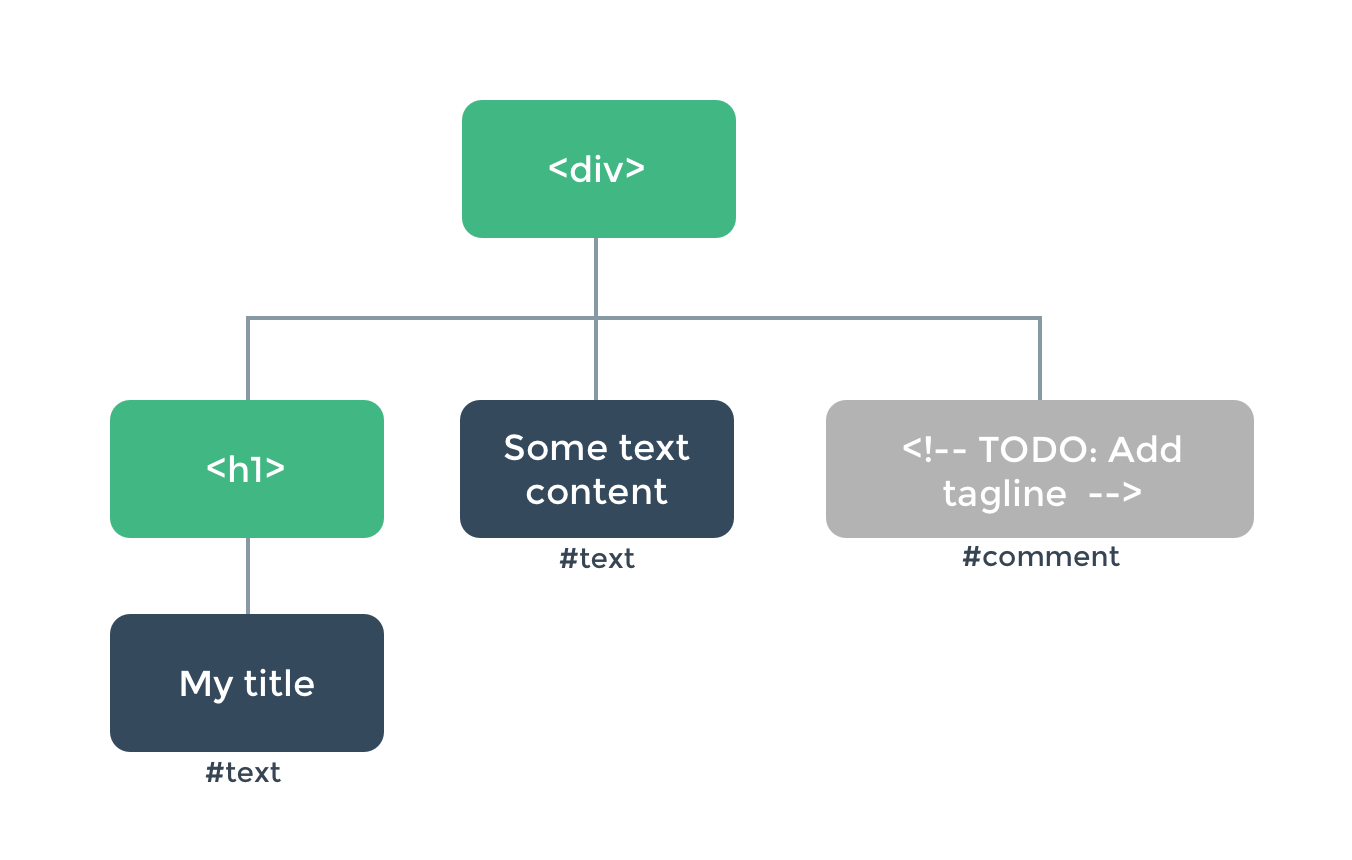
HTML DOM Node Tree
위 이미지는 HTML 코드를 DOM 노드 트리로 나타낸 것이다.
텍스트, 심지어 주석 조차 하나의 덩어리(노드)가 되어 트리의 한 부분이 된걸 알 수 있다.
이러한 노드의 어느 한 부분이 업데이트 되어야할 때, 전체 트리를 갱신하는 것은 굉장히 비효율적일 수밖에 없다.
그래서 고안된 방법이 바로 Virtual DOM이다.
가상 돔은 업데이트가 필요한 노드 정보만 정의하고 있다.
때문에 우린 수정을 원하는 노드만 업데이트 시켜줄 수 있다. 전체 노드트리를 갱신하지 않고도!
참고로 이 업데이트가 필요한 가상 돔의 노드들을 VNode라고 부른다.
이 가상 돔을 생성하는 메소드가 바로 createElement()이다.
사용 예를 살펴보자
위 코드의 h1 태그 내의 title 부분만 갱신시켜보겠다.
copy javascriptrender: function (createElement) {
  return createElement('h1', this.blogTitle)
}
h1 태그의 내용을 this.blogTitle로 변경하겠다는 뜻이다.
여기서 잠깐, 의문점이 들지 않는가?
copy javascriptrender: function (createElement) {
    return createElement(App);
}
위 코드에선 createElement의 전달 인자가 App으로 하나였는데,
가상 돔 예제에선 h1, this.blogTitle 으로 전달인자가 두개인 걸 알 수 있다.
copy javascriptcreateElement(renderElement: String | Component, children: String | Array)
createElement(renderElement: String | Componenet, definition: Object, children: String | Array)
결론은, createElement의 전달인자는 2개일수도, 3개일 수도 있다는 것이다.
App 처럼 전달 인자를 하나만 받아 컴포넌트 자체를 가상돔으로 렌더링 시킬 수 있고,
전달 인자를 두개(h1, this.blogTitle) 받아 h1 element 를 this.blogTitle이라는 값으로 업데이트한다고 정의할 수도 있다.
자세히 알아보기 - 공식문서
이로써 render: h => h(App); 에 대해 조금이나마 이해할 수 있게 되었다.
요약하자면,
render: h => h(App) 함수는 사실 createElement(App)의 반환 값이고,
createElement()는 가상 돔을 만들어 렌더링 하는 함수이다.
그리고 createElement를 h로 요약한 뒤, ES6의 화살표함수를 쓴 것이 지금의 render: h => h(App) 라는 것이다.
(h 는 hyperscript의 약자로 HTML 구조를 생성하는 스크립트를 의미함.)
store: store 는 Vue에 Vuex(store)를 주입한다는 뜻이다.
마찬가지로 동일한 방법으로 router 도 주입할 수 있다.
✌ Vuex의 핵심 속성
위 store.js에서 아래와 같이 state 속성을 써줬던 것 기억나는가?
copy cppexport const store = new Vuex.Store({
    state: {

    }
    // ...
});
/src/store.js
state와 같은 속성이 store 내엔 크게 5가지가 있다.
- state
- getters
- mutations
- actions
- modules
지금부터 이 5가지 속성에 대해 차근차근 알아보자.
🍕 state
state는 상태(state)의 집합이다.
Vuex 는 단일 상태 트리(single state tree) 를 사용하기 때문에 이 집합 내에서 현재 상태를 쉽게 찾을 수 있다.
단일 상태 트리(single state tree)
단일 상태 트리란, 쉽게 말해서 하나의 어플리케이션은 하나의 store만 가진다는 것을 의미한다.
하나의 store만 가지기 때문에 현재 state의 상태(snapshot)를 쉽게 찾을 수 있다.
단일 상태 트리라는 말이 다소 어렵게 느껴질 수 있으니 예제를 통해 알아보자
copy javascriptimport Vue from "vue";
import Vuex from "vuex";

Vue.use(Vuex);

export const store = new Vuex.Store({
    state: {
        count: 0
    }
});
/src/store.js
copy xml<template>
    <div>
        This is A View
        {{ count }}
    </div>
</template>

<script>
    export default {
        computed: {
            count () {
                return this.$store.state.count
            }
        }
    }
</script>

<style scoped>

</style>
/src/components/A.vue
copy xml<template>
    <div>
        This is B View
        {{ count }}
    </div>
</template>

<script>
    export default {
        computed: {
            count () {
                return this.$store.state.count
            }
        }
    }
</script>

<style scoped>

</style>
B.vue
현재 store의 state엔 count라는 상태가 있고, 그 상태를 각각 A와 B 화면에서 불러왔다

A, B 컴포넌트를 한 화면에 띄워봤다.
둘 다 0으로 count 가 동일하게 출력된걸 볼 수 있다.
이제 이 상태에서 A 컴포넌트에서 count의 값을 증가시켜보자.
+ 버튼을 만들고 클릭하면 count의 값이 증가되도록 해보았다.
copy xml<template>
    <div>
        This is A View
        {{ count }}
        <button @click="plus">+</button>
    </div>
</template>

<script>
    export default {
        computed: {
            count () {
                return this.$store.state.count
            }
        },
        methods: {
            plus() {
                this.$store.state.count++
            }
        }
    }
</script>

<style scoped>

</style>
/src/components/A.vue

'+' 를 누른 결과
A 컴포넌트 내에서 증가를 시켰는데, B 컴포넌트의 count 도 증가된 것을 확인할 수 있다.
이는 단일 상태 트리 이기 때문에 발생하는 결과이다. 말그대로 state의 상태가 단일(유일)하다는 것이다.
store의 state 화면에 출력 시키기
위 단일 상태 트리 예제를 통해 이미 state를 화면에 출력시키는 예를 살펴보았지만 한번 더 살펴보자.
간단한 예제를 통해 현재 state의 상태를 Vue 컴포넌트 화면에 출력시켜보겠다.
copy cppexport const store = new Vuex.Store({
    state: {
        count: 0
    },
});
/src/store.js
먼저 store.js 파일에 state.count를 추가해줬다. store에 count 상태를 보관한 것이다.
이 저장소에 보관된 count를 Vue 컴포넌트에 출력시켜보겠다.
store의 count는 어플리케이션에서 단 하나만 존재하는 것이기 때문에,
다른 컴포넌트에서 count의 상태가 변이시켰다면 현재 컴포넌트에서도 그 변화된 상태가 출력되어야 할 것이다.
그러기 위해서 Vue의 computed 속성을 통해 store의 state를 출력한다.
copy xml<template>
    <div>
        {{ count }}
    </div>
</template>

<script>
    export default {
        computed: {
            count () {
                return this.$store.state.count
            }
        }
    }
</script>

<style scoped>

</style>
/src/components/Counter.vue
Counter.vue라는 컴포넌트를 만들고 computed에 this.$store.state.count 를 반환하여 화면에 출력시켰다.
0이 올바르게 출력된걸 볼 수 있었다.🎉
mapState
computed에 선언된 상태(state)가 많으면, 코드가 반복적이고 장황해질 수 있다.
예를들면, 이런식으로.
copy javascriptcomputed: {
    count() {
        return this.$store.state.count
    },
    age() {
        return this.$store.state.age
    },
    isStudent() {
        return this.$store.state.isStudent
    }
}
this.$sotre.state 가 반복되는걸 알 수 있다.
이를 해결하기 위해 Vuex는 mapState 라는 Helper를 제공하고 있다.
copy htmlimport { mapState } from 'vuex'

export default {
  // ...
  computed: mapState({
    // #1 화살표 함수로 가져오기
    count: state => state.count,

    // #2 문자열로 가져오기 (`state => state.count`와 같다.)
    countAlias: 'count',

    // #3 `this`를 사용하여 로컬 상태에 액세스하려면 일반적인 함수를 사용해야한다
    countPlusLocalState (state) {
      return state.count + this.localCount
    }

    // #4 this.count를 store.state.count에 매핑한다.
      'count'
  })
}
mapState를 활용해 반복되는 코드를 없애고 state를 깔끔하게 정의할 수 있다.
mapState를 기존 로컬의 computed와 함께 사용하려면 객체 전개 연산자(Object Spread Operator) 를 사용하면 된다. 전개구문이라고도한다 (...)
copy less computed: {
  localComputed () { /* ... */ }, // 기존의 computed
  ...mapState({
    // ...
  })
}
📢 컴포넌트에는 여전히 로컬 상태(data())에 있을 수 있다.
Vuex를 사용한다고 해서 모든 상태를 store에 넣을 필요는 없다.
🍕 getters
state를 계산한 값을 사용해야할 때가 있다.
단일 상태 트리 파트에서 우린 count를 A 컴포넌트에서 증가시키는 예제를 진행했었다.
이렇게 각각의 컴포넌트에서 state를 증가시키면 반복 호출이 잦아져 비효율적인 로직이 된다.
getters는 그런 문제점을 해결해주는 속성이다.
getters는 state에 대한 변이를 각 컴포넌트에서 진행하는게 아니라, Vuex에서 변이를 수행하고 각 컴포넌트에서 state를 호출만 하도록 하게 한다.
예제로 살펴보자.
카운트를 증가시키는 로직을 Vuex 의 getters 에 넣어볼 것이다.
copy javascriptexport const store = new Vuex.Store({
    state: {
        count: 0
    },
    getters: {
        increaseCount(state) {
            return ++state.count;
        }
    }
});
/src/store.js
copy xml<template>
    <div>
        {{ count }}
    </div>
</template>

<script>
    export default {
        computed: {
            count () {
                return this.$store.getters.increaseCount;
            }
        }
    }
</script>

<style scoped>

</style>
/src/components/Counter.vue
1 이라는 증가된 값이 화면에 출력되는 걸 볼 수 있다.
getters는 이름 그대로 반환값이 있어야한다. 이 반환값은 state 뿐만 아니라 같은 getters가 될 수도 있다.
copy coffeescriptgetters: {
        increaseCount:(state, getters) => {
            return getters.getCurCount;
        },
        getCurCount: (state) => {
            return state.count;
        }
    }
getters는 따로 전달인자를 받을 수 없다. 곧 살펴볼 mutations 와의 차이점 이기도 하다.
하지만 함수를 반환하여 getters에 전달인자를 전달할 수 있다.
getters 는 따로 전달인자를 받을 수 없다고 되어있는데, increaseCount:(state, getters) => {}
여기서 보이는 state와 getters는 무엇일까?
이는 Vuex getters의 default 전달 인자로, 말그대로 현재 state와 getters를 나타낸다.
첫번째 전달인자는 state, 두번째는 getters, 세번째는 rootState, 네번째는 rootGetters이다.
(rootState 에 관련해서는 modules 파트에서 자세히 다뤄본다.
state외 전달인자는 예제에서도 알 수 있듯이 옵션이다.(써도 되고 써주지 않아도 되는...)
copy javascriptgetters: {
        increaseCount: (state) => (num) => {
            return state.count + num;
        },
    }

// 같은 의미
increaseCount: (function (state) {
  return function (num) {
    return state.count + num;
  };
});
mapGetters
state 파트에서 코드가 반복되는 걸 막기 위해 mapState를 사용한다고 했었다.
getters도 마찬가지로 mapGetters를 사용해 코드의 반복을 막을 수 있다.
(이 역시, 다른 computed 속성들과 함께 쓰고싶다면 전개구문을 사용하면 된다.)
copy csscomputed: {
    ...mapGetters([
      'doneTodosCount',
      'anotherGetter',
      // ...
    ])
  }
getter를 아래와 같이 다른 이름으로 매핑할 수도 있다.
store.getters.doneTodoxCount를 this.doneCount라는 이름으로 매핑한 경우이다.
copy css...mapGetters({
  doneCount: 'doneTodosCount'
})
🍕 mutations
mutations도 getters와 동일하게 state의 값을 변환 시킬 때 사용한다.
mutations와 getters의 차이점
- mutations는 전달인자를 받을 수 있다.
- getters는 computed에 등록 했지만 mutations는 methods에 등록한다.
mutations는 동기적 로직을 정의한다는 특징을 가지고 있다.
동기적, 말그대로 순차적으로 변이가 진행된다는 뜻이다.
여러 컴포넌트에서 하나의 상태를 변이시킨다면 현재 state가 어떤지 추적하기 어려울 것이다.
그 때, mutations에 정의한 상태변이함수를 commit 을 사용하여 명시적으로 호출하면 상태를 추적할 수 있다.
예를 통해 알아보자.
copy javascriptexport const store = new Vuex.Store({
  // ...
  mutations: {
    addCounter: function (state) {
      return state.counter++;
    }
  }
});
/src/store.js
copy xml<template>
    <div>
        {{ count }}
        <button @click="increaseCnt">+</button>
    </div>
</template>

<script>
    export default {
        computed: {
            count () {
                return this.$store.state.count;
            }
        },
        methods: {
            increaseCnt() {
                this.$store.commit('addCounter');
            }
        }
    }
</script>

<style scoped>

</style>
Counter.vue
store.js 의 mutations에 addCounter라고 count 값을 증가시키는 메소드를 정의했다.
Counter.vue에선 methods내에 commit을 사용하여 addCounter를 호출했다.

+를 누르면 count가 증가함
mutations를 통해 count 값이 올바르게 증가하는 걸 확인할 수 있다.
commit은 type 속성을 가진 객체로 mutations의 메소드를 불러올 수도 있다.
copy cssstore.commit({
  type: 'addCounter',
  amount: 10 // 전달인자 (아래에서 설명)
})
mutations는 동기적 로직을 다루기 때문에 this.$store.mutations.addCounter 등으로 메소드를 호출할 수 없다.
반드시 commit을 사용하여 명시적으로 호출해 state의 추적이 가능하게 해야한다.
mutations의 전달 인자
getters와 mutations의 차이점으로 전달인자가 있다고 했었다.
mutations에서 어떻게 전달인자를 받아오는 지 살펴 보자.
copy cpp// ...
mutations: {
  increment (state, n) {
    state.count += n
  }
}
store.js
copy cssmethods: {
    increaseCnt(num) {
        store.commit('increment', num)
    }
}
Counter.vue
commit에 추가 전달 인자를 붙여 전달인자를 넘길 수 있다. 이 추가 전달 인자 부분을 payload라고 한다.
payload는 아래와 같이 객체 형태로 전달 될 수도 있다.
copy cpp// ...
mutations: {
  increment (state, payload) {
    state.count += payload.amount
  }
}
store.js
copy lessstore.commit('increment', {
  amount: 10
})
Counter.vue
mapMutations
mapState, mapGetters 와 마찬가지로 mapMutations를 사용하여 mutations를 간결하게 정리할 수 있다.
mapState, mapGetters 와 다른 점은 methods에 정의해줬다는 점이다.
copy javascriptimport { mapMutations } from 'vuex'

methods: {
  // Vuex 의 Mutations 메서드 명과 App.vue 메서드 명이 동일할 때 [] 사용
  ...mapMutations([
    'addCounter'
  ]),
  // Vuex 의 Mutations 메서드 명과 App.vue 메서드 명을 다르게 매칭할 때 {} 사용
  ...mapMutations({
    addCounter: 'addCounter' // 앞 addCounter 는 해당 컴포넌트의 메서드를, 뒤 addCounter 는 Vuex 의 Mutations 를 의미
  })
}
mapMutations로 사용하므로써 this.$store.commit('addCounter')를 this.addCounter 로만 쓸수 있다.
🍕 actions
mutations는 동기적 변이를 다룬다고 하였다.
actions는 그와 반대로, 비동기적 변이를 다루는 속성이다.
주로 setTimeout()이나 서버와의 http 통신 처리와 같이 결과를 받아올 타이밍이 예측되지 않는 로직을 actions에 선언한다.
mutations에서 상태의 변이를 추적하기위해 commit을 사용한다고 했었다.
actions 역시 비동기적 상태를 추적해야하기 때문에 commit을 사용한다.
결국 actions는 정리하자면 mutations의 메소드를 actions에 commit으로 호출하여 비동기 관리를 한다는 것이다.
예를 들어 살펴보자.
copy javascriptexport const store = new Vuex.Store({
  // ...
  mutations: {
    addCounter: function (state, payload) {
      return state.counter++;
    }
  },
  actions: {
    addCounter: function (context) {
      return context.commit('addCounter');
    }
  }
});
/src/store.js
actions에서 commit으로 mutations의 메소드인 addCounter를 호출한 걸 알 수 있다.
여기서 주목해야할 것은 context 이다. mutations나 getters는 state나 getters, 를 받아왔었는데(혹은 전달인자 payload), 이 context는 무엇일까?

console.log(context)
콘솔에 context를 찍어보니, state와 getters를 모두 포함한 Object 임을 알 수 있었다.
이 Object 는 현재 저장소(store) 인스턴스의 같은 메소드/프로퍼티 세트를 나타내는 Vuex 컨텍스트 객체이다.
context.getters, context.state를 여러번 써주지 않기 위해서 구조분해할당을 사용할 수 있다.
copy javascriptaddCounter: function ({commit}) {
      return commit('addCounter');
    }
다음으로 컴포넌트 methods에서 actions 메소드를 호출하는 방법에 대해 알아보자.
copy kotlin methods: {
            increaseCnt() {
                this.$store.dispatch('addCounter');
            }
        },
Conter.vue
mutations에선 컴포넌트 methods에서 commit을 사용했지만, actions는 dispatch를 사용한다.
mutations은 추적 가능한 상태변이를 명시적으로 호출하기 위해 commit을 사용한다. 이 commit은 사용하는 즉시 상태 변이가 실행된다 (동기적)
dispatch는 이러한 commit을 비동기적으로 관리할 수 있게한다.
action내에 정의된 commit의 호출 시기를 비동기적으로 지정하므로써 말이다.
예를 들어 살펴봅시다.
copy coffeescriptactions: {
  incrementAsync ({ commit }) {
    setTimeout(() => {
      commit('increment')
    }, 1000)
  }
}
/src/store.js
copy cssmethods: {
    increaseCnt() {
        this.$store.dispatch('incrementAsync');
    }
}
Counter.vue
Counter 컴포넌트에서 dispatch 를 통해 actions의 incrementAsync 메소드를 호출했다.
incrementAsync 메소드 내를 살펴보니,
setTimeout을 통해 비동기적으로 commit이 호출되고 있었다.
이로써 비동기적 상태 변이가 가능한 것이다.
단순히 dispatch를 사용했다고 비동기가 되는 것이 아니라 actions 메소드 내에 비동기적으로 commit을 호출하기 때문에 actions가 비동기적 로직을 다룬다고 하는 것이다.
결국 쉽게 말하면 actions는 mutations + commit의 짬뽕이라고 할 수 있다
actions는 mutations 과 마찬가지로 전달인자를 받을 수 있고,
type속성을 포함한 객체를 받을수도 있다.
copy less// 페이로드(전달인자)와 함께 디스패치
store.dispatch('incrementAsync', {
  amount: 10
})

// type속성을 포함한 객체와 함께 디스패치
store.dispatch({
  type: 'incrementAsync',
  amount: 10
})
Promise/then, async/await
actions는 비동기적 로직을 다룬다고 했다.
액션이 완료된 후에 다음 상태변이가 비동기적으로 실행되려면 어떻게 해야할까?
우리는 보통 언제 끝날지 모르는 프로세스의 다음 행위를 위해 Promise/then, async/await를 사용한다.
예제를 통해 알아보자
Promise/then
copy coffeescriptactions: {
  actionA ({ commit }) {
    return new Promise((resolve, reject) => {
      setTimeout(() => {
        commit('someMutation')
        resolve()
      }, 1000)
    })
  }
}
/src/store.js
copy lessstore.dispatch('actionA').then(() => {
  // ...
})
/src/components/Counter.vue
또는,
copy coffeescriptactions: {
  // ...
  actionB ({ dispatch, commit }) {
    return dispatch('actionA').then(() => {
      commit('someOtherMutation')
    })
  }
}
/src/store.js
async/awiat
copy javascript// getData() 및 getOtherData()가 Promise를 반환한다고 가정
actions: {
  async actionA ({ commit }) {
    commit('gotData', await getData())
  },
  async actionB ({ dispatch, commit }) {
    await dispatch('actionA') // actionA가 끝나기를 기다림
    commit('gotOtherData', await getOtherData())
  }
}
mapActions
actions 역시 this.$store.dispatch('xxx')의 반복을 막기 위해 mapActions 라는 헬퍼를 제공한다.
copy javascriptimport { mapActions } from 'vuex'

export default {
  // ...
  methods: {
    ...mapActions([
      'increment' // this.increment()을 this.$store.dispatch('increment')에 매핑

      // mapActions는 페이로드를 지원
      'incrementBy' // this.incrementBy(amount)를 this.$store.dispatch('incrementBy', amount)에 매핑
    ]),
    ...mapActions({
      add: 'increment' // this.add()을 this.$store.dispatch('increment')에 매핑
    })
  }
}
🍕 moodules
저장소의 규모가 커지면 관리가 힘들어질 수도 있다.
그 때, 우린 저장소를 모듈화 할 수 있다.
각각의 state, mutations, getters 등을 포함하는 저장소 여러개로 나눌 수 있다는 의미이다.
🚀 모듈화란?
특정 기준을 두고, 그 기준에 따라 리소스를 단위로 분리하는 것을 의미한다.
예를 들어, 똑같은 메소드 A 를 여러 파일에서 쓰고 있다고 하자.
이 A 메소드를 수정하고 싶다면, A 메소드를 사용 중인 모든 파일에 가서 일일이 수정을 해줘야한다.
A 메소드를 관리하기 굉장히 어려워진다. 이 때 우린 모듈화를 해줄 수 있다.
A 메소드를 Util.js 따위의 공용화 파일에 한번만 정의한 후, A 메소드가 필요하다면 Util.js의 A 메소드를 불러와 사용하는 것이다.
한마디로 어떤 리소스(여기선 A 메소드)를 따로 분리하여 관리하는 것이다.
저장소의 모듈화 같은 경우,
state, getters, mutataions의 크기가 너무 커져서 컴포넌트에서 저장소를 호출할때 무리가 생길 수 있다.
때문에 어떤 우린 기준을 두고 저장소를 쪼갠뒤, 필요시에만 쪼갠 일부 저장소만 호출해서 쓰는 것이다
이 역시 분리해서 관리한다의 모듈화를 의미한다.
copy propertiesconst moduleA = {
  state: () => ({ ... }),
  mutations: { ... },
  actions: { ... },
  getters: { ... }
}

const moduleB = {
  state: () => ({ ... }),
  mutations: { ... },
  actions: { ... }
}

const store = new Vuex.Store({
  modules: {
    a: moduleA,
    b: moduleB
  }
})

store.state.a // -> moduleA'의 상태
store.state.b // -> moduleB'의 상태
위 코드를 보면 Store 인스턴스에 modules라는 속성이 있다.
modules는 각각의 state, mutations, getters 등을 포함한 Object를 담고 있다.
저장소를 쪼개어 관리할 수 있다는 걸 알 수 있다.
우리가 예제로 봤었던 getters와 mutations의 첫번째 인자 state는 모듈화 되었을 때,
각 모듈의 지역 상태가 된다.
actions의 context에서도 context.state는 지역 상태이다.
루트의 상태는 context.rootState로 표시된다. rootState는 getters의 세번째 전달인자로 노출되기도 한다.
copy kotlin// actions
const moduleA = {
  // ...
  actions: {
    incrementIfOddOnRootSum ({ state, commit, rootState }) {
      if ((state.count + rootState.count) % 2 === 1) {
        commit('increment')
      }
    }
  }
}

// getters
const moduleA = {
  // ...
  getters: {
    sumWithRootCount (state, getters, rootState) {
      return state.count + rootState.count
    }
  }
}
네임스페이스
모듈이 여러개 존재할 때, 모듈간의 충돌이 발생할 수 있다. 예를 들면, 각각 다른 모듈 내에 같은 이름이 같은 state, mutations가 있는 경우 등에서 충돌이 발생할 수 있겠다.
이러한 충돌을 방지하기 위해 Vuex 는 네임스페이스라는 기능을 제공한다.
네임 스페이스는 모듈 내에 namespaced: true로 활성화 할 수 있다.
네임스페이스란, 컴포넌트에서 store 요소(getters 등)를 호출 할 때, 해당 store 모듈의 이름을 붙여 호출하는 것이다.
이 호출이 어떤 저장소 모듈에서 불러오는 건지 명시하여 충돌을 예방하는 것.
예제로 살펴 보자.
copy yamlexport const store = new Vuex.Store({
    modules: {
        moduleA: {
            // namespaced: true,
            state: {
                count: 0
            },
            mutations: {
                addCounter: (state) => {
                    return state.count++;
                }
            }
        },
        moduleB: {
            // namespaced: true,
            state: {
                count: 0
            },
            mutations: {
                addCounter: (state) => {
                    return state.count++;
                }
            }
        },
    },
});
/src/store.js
namespaced를 활성화하지 않은 moduleA와 moduleB를 정의해줬다.
두 모듈은 모두 addCounter라는 각각의 mutations를 가지고 있다.
A, B 컴포넌트를 각각 만들어 각 카운트와 카운트를 증가시키는 버튼을 출력해봤다.
copy xml<template>
    <div>
        {{ count }}
        <button @click="increaseCnt">+</button>
    </div>
</template>

<script>
    export default {
        computed: {
            count () {
                return this.$store.state.moduleA.count;
            }
        },
        methods: {
            increaseCnt() {
                console.log(this.$store.state.moduleA);
                this.$store.commit('addCounter');
            }
        },
    }
</script>

<style scoped>

</style>
/src/components/A.vue
copy xml<template>
    <div>
        {{ count }}
        <button @click="increaseCnt">+</button>
    </div>
</template>

<script>
    export default {
        computed: {
            count () {
                return this.$store.state.moduleB.count;
            }
        },
        methods: {
            increaseCnt() {
                this.$store.commit('addCounter');
            }
        },
    }
</script>

<style scoped>

</style>
/src/components/B.vue
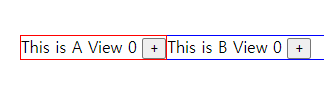
A, B 컴포넌트를 한 화면에 출력한 결과
A.vue는 분명히 moduleA의 count를 출력하고 있고,
B.vue는 분명히 moduleB의 count를 출력하고 있다.
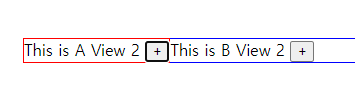
A, B 컴포넌트를 한 화면에 출력한 결과
하지만 A의 플러스 버튼을 눌렀을 때, B 컴포넌트의 카운트까지 함께 증가하는 걸 볼 수 있다.
서로 다른 모듈의 카운트를 가리키고 있는데도 말이다. 😱
이는 기본적으로 모든 모듈 내의 actions, mutations, getters는 여전히 전역 네임 스페이스 아래에 등록되어 있기 때문에 발생한다. 본인이 어떤 모듈 출신인지 모르는 것. 때문에 여러 모듈이 동일한 동작을 보였던 것이다.
이를 해결해주는게 네임 스페이스이다.
namespaced: true의 주석을 풀어 네임스페이스를 활성화하고,
A, B 컴포넌트의 commit을 아래와 같이 수정해봤다.
copy kotlin// A.vue
this.$store.commit('moduleA/addCounter');

// B.vue
this.$store.commit('moduleB/addCounter');
A View의 플러스 버튼을 세번 누른 결과
네임스페이스로 모듈이 구분되어 올바른 결과가 나온걸 확인할 수 있었다.
네임스페이스 모듈 내부에서 전역 자산 접근
getters 의 전달인자 부분에서 잠깐 언급됐었는데,
getters와 actions는 각각 디폴트 인자를 가지고 있다.
copy less// getters
someGetter (state, getters, rootState, rootGetters) {
        // ...
    },

// actions (context 인자 내에 있는 속성들)
someActions ({ dispatch, commit, getters, rootGetters }) {
        // ...
    }
이 rootGetters, 혹은 rootSetters를 통해 namespaced가 정의된 모듈 내에서 전역 자원에 접근할 수 있다.
copy javascriptmodules: {
  foo: {
    namespaced: true,

    getters: {
      // `getters`는 해당 모듈의 지역화된 getters
      // getters의 4번째 인자를 통해서 rootGetters 사용 가능
      someGetter (state, getters, rootState, rootGetters) {
        getters.someOtherGetter // -> 'foo/someOtherGetter'
        rootGetters.someOtherGetter // -> 'someOtherGetter'
      },
      someOtherGetter: state => { ... }
    },

    actions: {
      // 디스패치와 커밋도 해당 모듈의 지역화된 것
      // 전역 디스패치/커밋을 위한 `root` 옵션 설정 가능
      someAction ({ dispatch, commit, getters, rootGetters }) {
        getters.someGetter // -> 'foo/someGetter'
        rootGetters.someGetter // -> 'someGetter'

        dispatch('someOtherAction') // -> 'foo/someOtherAction'
        dispatch('someOtherAction', null, { root: true }) // -> 'someOtherAction'

        commit('someMutation') // -> 'foo/someMutation'
        commit('someMutation', null, { root: true }) // -> 'someMutation'
      },
      someOtherAction (ctx, payload) { ... }
    }
  }
}
/src/store.js
위 코드의 root:true 가 보이는가?
전역 actions을 dispatch 하거나 mutations를 commit 하려면
dispatch 와 commit 의 3번째 인자에 { root: true } 를 전달하면 된다
네임스페이스 모듈 내부에서 전역 액션 등록
네임 스페이스 모듈에서 전역 actions를 등록하려면 root: true를 표시하고
handler 함수에 actions를 정의하면 된다.
copy yamlactions: {
    someOtherAction ({dispatch}) {
      dispatch('someAction')
    }
  },
  modules: {
    foo: {
      namespaced: true,

      actions: {
        someAction: {
          root: true,
          handler (namespacedContext, payload) { ... } // -> 'someAction'
        }
      }
    }
  }
/src/store.js
이로써 전역 액션인 someOtherActions을 호출하면 foo 모듈에 정의된
someAction 이 실행될 것이다.
헬퍼에서 네임스페이스 바인딩
헬퍼에는 mapState, mapGetters, mapActions, mapMutations 가 있다고 했었다.
헬퍼에서 네임스페이스 모듈을 컴포넌트에 바인딩할 때 조금 장황하게 될수 있다.
copy coffeescriptcomputed: {
  ...mapState({
    a: state => state.some.nested.module.a,
    b: state => state.some.nested.module.b
  })
},
methods: {
  ...mapActions([
    'some/nested/module/foo', // -> this['some/nested/module/foo']()
    'some/nested/module/bar' // -> this['some/nested/module/bar']()
  ])
}
중첩된 모듈의 네임스페이스 때문에 같은 코드가 반복되고 길어진걸 볼 수 있다.
이는 모듈의 네임스페이스 문자열을 헬퍼의 첫번째 인수로 전달하여 간결화 할 수 있다.
copy csscomputed: {
  ...mapState('some/nested/module', {
    a: state => state.a,
    b: state => state.b
  })
},
methods: {
  ...mapActions('some/nested/module', [
    'foo', // -> this.foo()
    'bar' // -> this.bar()
  ])
}
또한 createNamespacedHelpers를 사용하여 네임스페이스 헬퍼를 생성할 수 있다.
copy javascriptimport { createNamespacedHelpers } from 'vuex'

const { mapState, mapActions } = createNamespacedHelpers('some/nested/module')

export default {
  computed: {
    // `some/nested/module`에서 찾음
    ...mapState({
      a: state => state.a,
      b: state => state.b
    })
  },
  methods: {
    // `some/nested/module`에서 찾음
    ...mapActions([
      'foo',
      'bar'
    ])
  }
}
동적 모듈 등록
store.registerModule 메소드로 저장소(store)가 등록된 후에도 모듈을 등록할 수 있다.
copy lessstore.registerModule('myModule', {
  // ...
})

// `nested/myModule` 중첩 모듈 등록
store.registerModule(['nested', 'myModule'], {
  // ...
})
store.unregisterModule(moduleName) 로 동적으로 등록된 모듈을 제거할 수도 있다.
정적 모듈은 제거할 수 없다
'Vue.js' 카테고리의 다른 글
| #5. Vue.js - Vue CLI (0) | 2023.08.08 |
|---|---|
| #4. Vue.js - 템플릿 문법, 양방향 데이터바인딩, 데이터변화 감지 (0) | 2023.08.08 |
| #3. Vue.js - Routing(페이지이동), Axios(API 비동기 통신) (0) | 2023.08.08 |
| #2. Vue.js - 컴포넌트 통신규칙 (1) | 2023.08.08 |
| #1. Vue.js 란? (1) | 2023.08.08 |
